AI Lead Automation.
A lead intake and qualification pipeline that connects a form, Twenty CRM, follow-up email and booking events. Built as a local portfolio implementation with explicit handling for duplicate requests, integration failures and AI fallback.
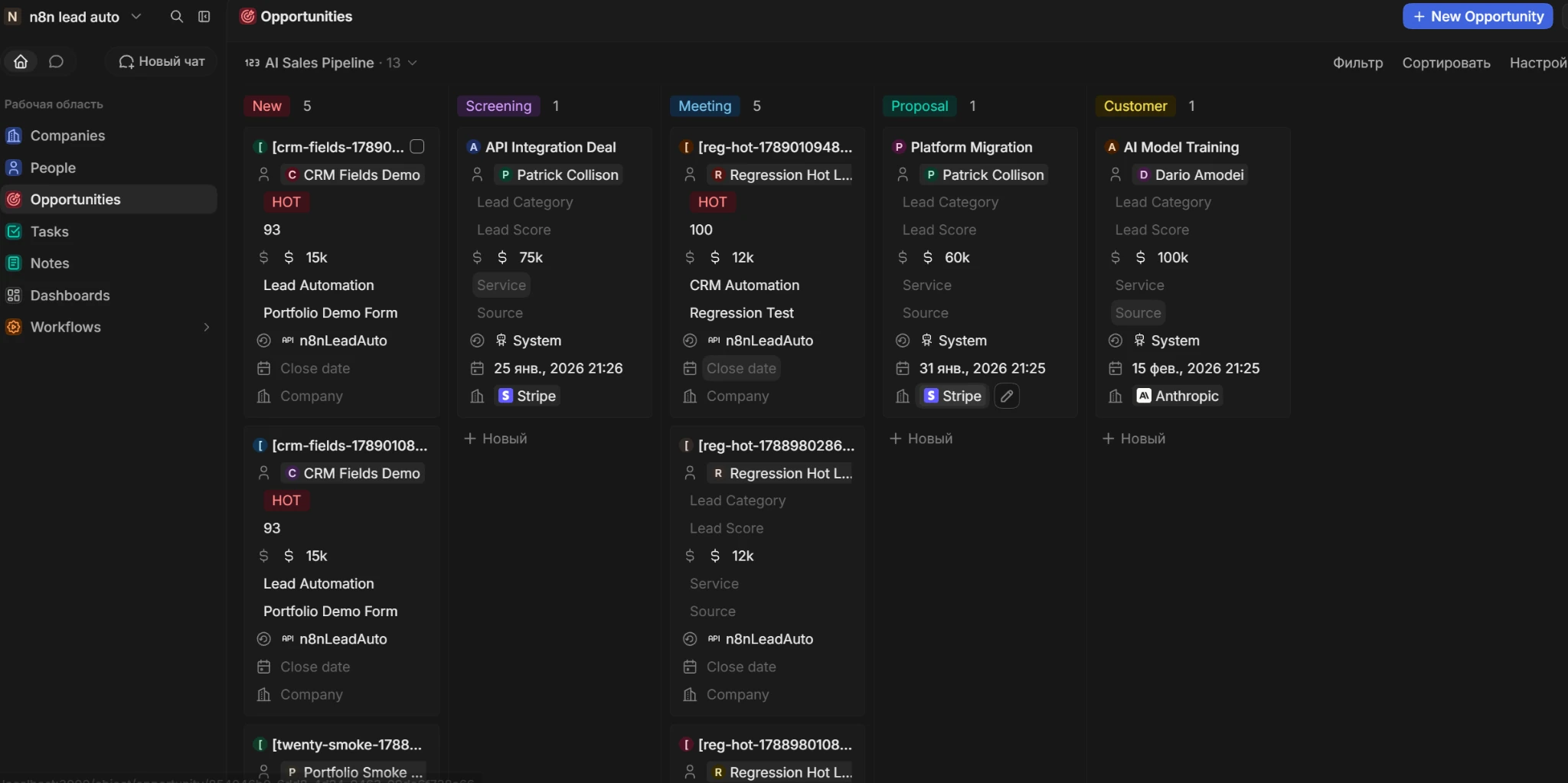
A lead becomes an opportunity.
Twenty CRM in the local demo. The screen contains test records and bundled CRM sample data; company names and amounts are not client references or commercial results.
- HOT / WARM / COLD
- Three qualification paths
- Twenty + Mailpit
- Real CRM and local email delivery
- 11 / 11
- Scenarios passed in the repository’s local test report
On this page
The problem
A form submission is only the start. Someone still has to review the request, create the contact, decide whether it belongs in the sales pipeline and write the next email. Repeated webhook deliveries can create even more manual cleanup.
The working solution
The n8n workflow validates and normalizes the payload, checks its request ID, then produces a score and a HOT, WARM or COLD category. It creates or updates a Person in Twenty by email. Only HOT leads receive a linked Opportunity.
- Follow-up content changes with the qualification result; HOT leads also trigger a sales notification.
- Calendly’s invitee.created event finds the lead by email and advances its Opportunity to an available meeting-related stage.
- Processing state and lifecycle audit records are stored separately for duplicate handling and troubleshooting.
A reproducible local demo
The default configuration uses deterministic qualification (mockAI=true), while Twenty CRM and SMTP delivery to Mailpit are real local integrations. An optional OpenAI Responses API branch returns structured qualification data and falls back to rule-based scoring when the response is unavailable or unusable.
View implementationFrom request to next step
The main workflow handles intake and follow-up. Booking events arrive through a separate Calendly webhook.
- 01
Receive & validate
Form or POST webhook. Invalid requests stop before CRM and email calls.
- 02
Check request state
A request ID identifies completed or recently processing requests.
- 03
Qualify the lead
Deterministic local mode, or structured OpenAI output with fallback.
- 04
Update Twenty CRM
Upsert the Person by email. Create or reuse an Opportunity for HOT leads.
- 05
Follow up & record
Send the appropriate email, notify sales for HOT leads and record completion.
- 06
Handle the booking
A separate Calendly event advances the linked deal; no-deal leads take a safe path.
Three leads. Three next steps.
Expected results for the sample requests committed to the repository, using its deterministic local scoring.
Budget 12,000 USD · 80 people · CRM automation
Create or update the contact, link an Opportunity, send a discovery-call invitation and notify sales.
View sample payloadBudget 2,500 USD · 8 people · Workflow automation
Create or update the contact and ask for current tools, expected volume and timing. Keep the sales pipeline free of an early deal.
View sample payloadBudget 200 USD · 1 person · Consultation
Save the contact and acknowledge the request. No Opportunity or sales notification is created.
View sample payloadThese are demo scoring results, not conversion metrics. The optional OpenAI mode can produce different scores.
Why it works this way.
Check duplicates before side effects
Completed request IDs return already_completed. Recent processing requests return already_processing. Twenty contacts are also matched by email before creating a record.
View implementationKeep AI behind a stable contract
Both AI modes feed the same qualification fields into CRM logic. A deterministic fallback records its provider and reason instead of leaving downstream steps without a result.
View implementationTreat booking as a separate event
The booking workflow discovers available Twenty stages, updates the linked Opportunity and records the booking. A lead without a deal returns a safe no-deal response.
View implementationInside the local demo.
Original screenshots from the project repository. The interface is Twenty CRM; the work shown is the automation and integration around it. All records are from the demo environment.
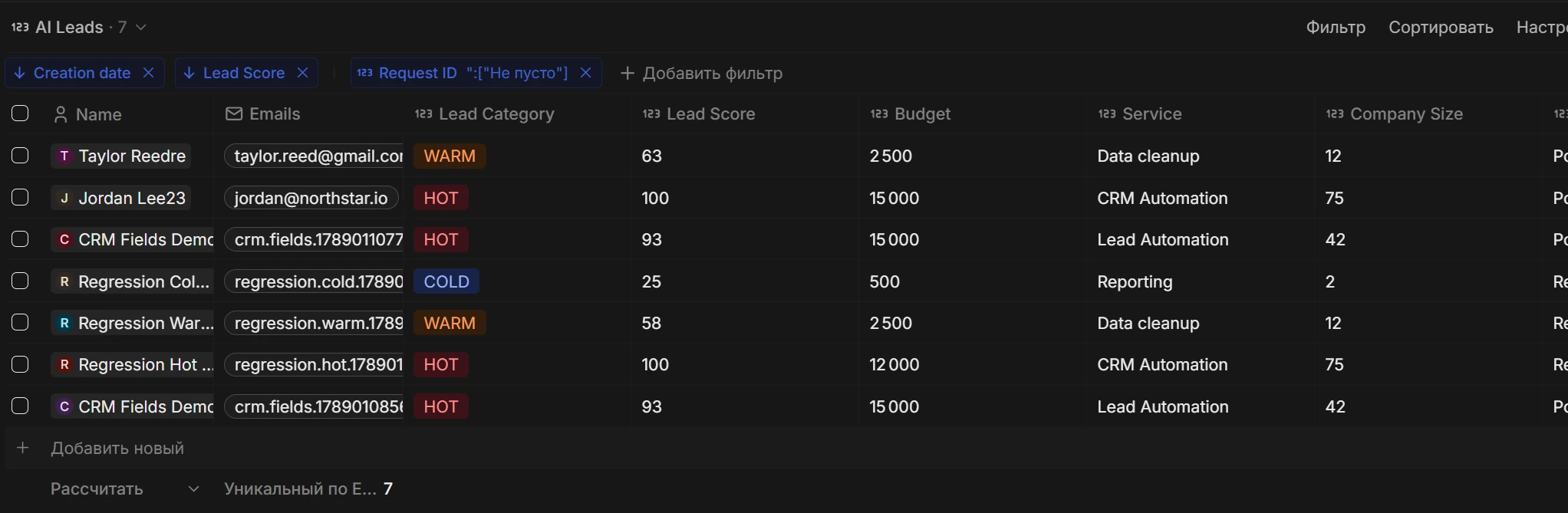
Qualification, visible in the CRM.
The AI Leads view brings category, score, budget and requested service into one list.
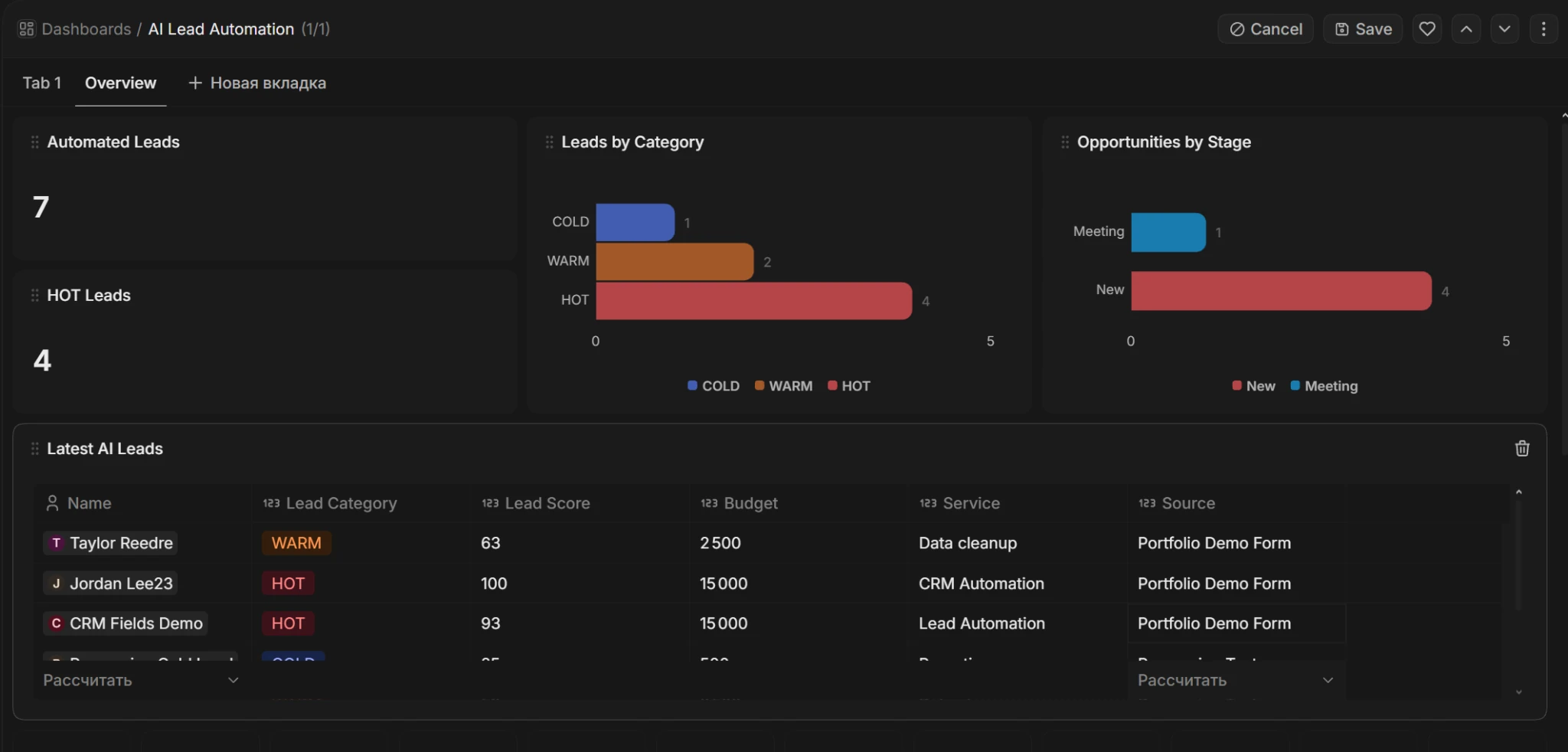
A view of the local pipeline.
The dashboard groups demo leads by category and opportunities by stage. Its numbers describe the demo dataset.
What the repository’s tests cover
The committed regression report records 11 passed scenarios on a local Twenty + Mailpit stack. Qualification was mocked; CRM operations and local SMTP delivery were exercised.
Read the recorded test report- Invalid payloads and HOT / WARM / COLD paths
- Repeated requests and Person upsert
- Calendly stage update, no-deal and ignored-event paths
- Webhook registration and Mailpit delivery
Local portfolio project. The repository documents additional hardening needed before exposing the automation publicly.
AI Lead Automation